Think Before You Trust
Cybercriminals no longer need to break into a computer to steal information.
Sometimes, they only need you to trust the wrong message, click the wrong link, answer the wrong call, or believe the wrong person on a video call.
Cyber scams are becoming more convincing every day. Attackers are using social engineering, fake websites, stolen identities, AI-generated voices and even realistic AI-generated video to make scams look genuine.
The most important security tool is often not software.
It is awareness.
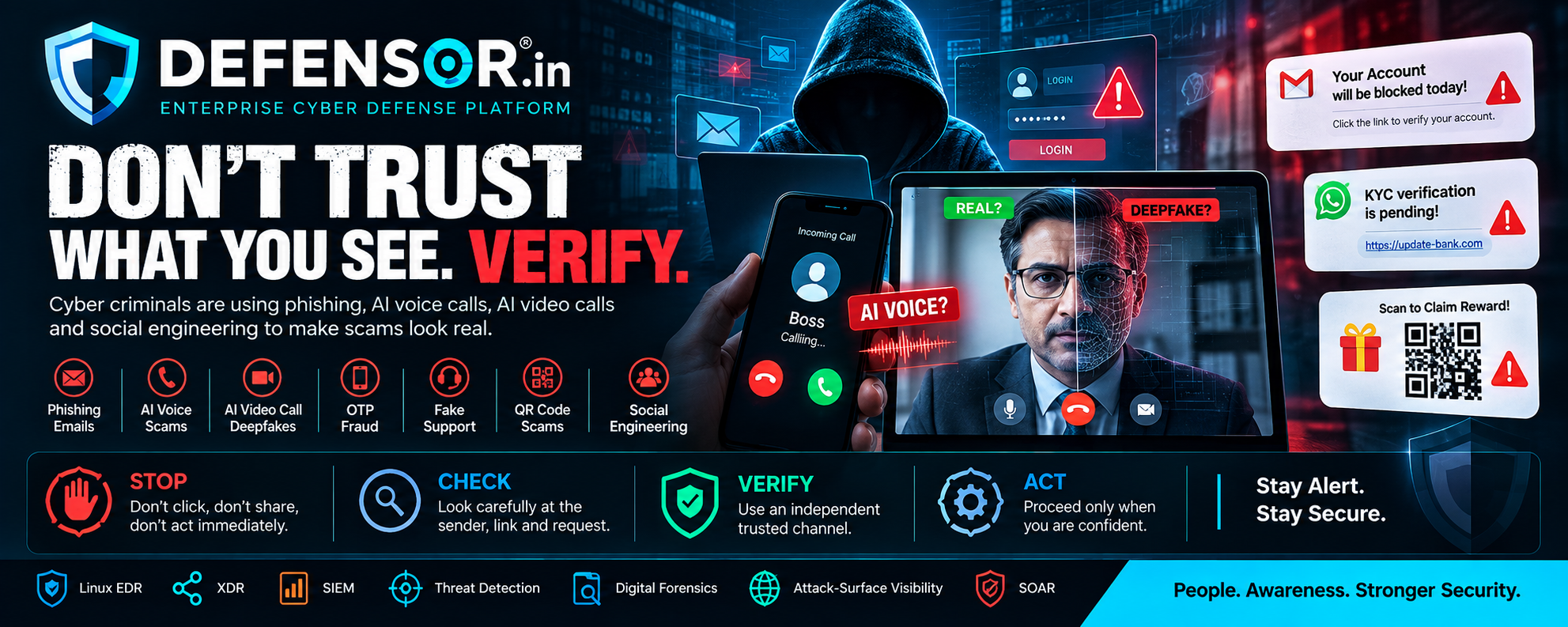
🎣 1. Phishing: The Classic Threat That Still Works
Phishing is one of the most common forms of cyberattack.
You may receive an email, SMS, WhatsApp message or social media message saying:
"Your account will be blocked today."
"Your payment has failed."
"Your KYC verification is pending."
"Your parcel could not be delivered."
"Your company account requires immediate verification."
The message may contain a link that looks completely legitimate.
But the link can lead to a fake website designed to steal:
- Username
- Password
- Banking information
- Card details
- OTP
- Personal information
- Corporate credentials
Don't trust a link just because the message looks professional.
Before clicking, verify the sender and the actual destination.
🤖 2. AI Voice Scams: "It Sounds Exactly Like Them"
Artificial intelligence has made voice impersonation much more convincing.
Imagine receiving a phone call from someone who sounds exactly like your:
Boss.
Friend.
Family member.
Business partner.
They urgently ask you to transfer money, share a verification code or perform an action.
The voice may sound real.
But the person may not be real.
Create a verification habit.
If someone asks for money, passwords, OTPs or sensitive information through an unexpected call:
STOP → HANG UP → VERIFY THROUGH ANOTHER CHANNEL
Call the person back using a number you already know.
Don't simply call the number provided by the caller.
🎥 3. AI Video Call Scams: Seeing Is No Longer Always Believing
This is one of the biggest challenges emerging from generative AI.
Attackers can potentially use manipulated or AI-generated video to impersonate another person during an online meeting or video call.
Imagine joining a video call with someone who appears to be:
Your CEO.
Your manager.
Your customer.
Your bank representative.
They may ask you to:
- Transfer money
- Share confidential documents
- Reveal credentials
- Approve a transaction
- Install software
- Change account information
The video can create a powerful feeling of trust.
But remember:
A face on a screen is not automatically proof of identity.
For high-value or sensitive requests, use an independent verification process.
For example:
Video Call → Stop → Verify by Phone / Official Channel → Confirm → Act
🔐 4. OTP Is Not a Verification Tool for Strangers
One of the most dangerous scam patterns is:
"Please tell me the OTP you just received."
The attacker may claim to be from a bank, company, delivery service, technical support team or government department.
Your OTP is designed to authorize an action.
Never share an OTP with another person.
Not with a caller.
Not with "support."
Not with someone claiming to be your bank.
Not with someone appearing on a video call.
If you did not initiate the transaction, stop and investigate.
📱 5. Fake Customer Support Scams
Searching for customer support online can sometimes lead people to fake support accounts or fraudulent websites.
The attacker may say:
"We can fix your account."
Then they may ask you to:
- Install remote-access software
- Share your screen
- Provide OTPs
- Enter your password
- Transfer money
- Download an unknown application
Use the official website or official application to find support information.
Never trust a phone number simply because it appears in a search result, social media comment or message.
🔳 6. QR Code Scams
QR codes are convenient—but they can also be abused.
A QR code can redirect you to:
- A phishing website
- A fake payment page
- A malicious download
- A fraudulent login page
Before scanning a QR code, ask:
Who provided it?
Why am I being asked to scan it?
Where does it take me?
Never assume that a QR code is safe simply because it looks professional.
💻 7. Fake Software Updates and Downloads
Cybercriminals may use messages such as:
"Your browser needs an urgent security update."
"Install this application to continue."
"Download this document viewer."
"Your computer is infected. Call support immediately."
These messages can lead to malicious software.
Download software from trusted and official sources.
Avoid installing software simply because a pop-up tells you to.
🧠 8. Social Engineering: The Real Weapon
Many successful cyberattacks do not begin with sophisticated malware.
They begin with psychology.
Attackers create:
Urgency
"Do this immediately."
Fear
"Your account will be closed."
Authority
"I am calling from your bank."
Trust
"I'm your manager."
Curiosity
"Look at this photo."
Opportunity
"You have won a reward."
The objective is to make you act before you think.
🚨 The Golden Rule: Slow Down
When something feels urgent, slow down.
Ask yourself:
Did I expect this message?
Do I know this person?
Is the request unusual?
Why are they asking for secrecy?
Why do they need an OTP?
Why do they want remote access?
Can I verify this through another channel?
A few seconds of verification can prevent a major security incident.
🛡️ A Simple Security Habit for Everyone
Remember this:
STOP → CHECK → VERIFY → ACT
STOP
Don't immediately click, transfer money or share information.
CHECK
Look carefully at the sender, website, email address and request.
VERIFY
Use an independent trusted channel.
ACT
Only proceed when you are confident that the request is legitimate.
👨💼 For Businesses: Build Verification Into Your Process
Businesses should not depend entirely on employees identifying every sophisticated scam.
Create security procedures for sensitive actions.
For example:
Financial Transfers
Require independent confirmation.
Password Reset
Use established identity verification.
Sensitive Documents
Confirm the recipient before sharing.
Executive Requests
Verify unusual requests through another communication channel.
New Bank Details
Require secondary approval.
Remote Access
Never allow unexpected remote access based solely on a phone call or video call.
Security should be part of the process, not just the employee's memory.
🔥 AI Is Changing Cybersecurity
Artificial intelligence can help defenders detect threats faster.
But attackers can also use AI to make scams more convincing.
This means cybersecurity awareness must evolve.
In the past, people often looked for:
Bad spelling.
Poor grammar.
Low-quality websites.
Strange-looking messages.
Those clues can still exist—but they are no longer enough.
Modern users need to ask a more important question:
"Can I independently verify this request?"
That question can protect you even when the message, voice or video looks completely authentic.
🛡️ Cybersecurity Is Everyone's Responsibility
Cybersecurity is not only the responsibility of IT teams.
It involves:
Employees.
Managers.
Business owners.
Students.
Families.
Customers.
Everyone who uses the internet.
Technology can protect systems.
But awareness protects decisions.
Final Reminder
The next scam may not look like a scam.
It may come from a familiar name.
It may use a familiar voice.
It may appear on a professional-looking website.
It may even appear as a video call from someone you know.
Don't trust appearances alone. Verify before you act.
Stay Alert. Stay Secure. Think Before You Trust.
DEFENSOR.in
Enterprise Cyber Defense Platform