
Centralized Linux Security Monitoring for Your Entire Infrastructure
Managing one Linux server is straightforward. But what happens when you need to manage five, ten, or dozens of servers across different applications, databases, and environments?
Logging in to every server individually to check its status and investigate security events can become time-consuming. Important alerts may be overlooked, and understanding the overall security situation across your infrastructure can become more difficult.
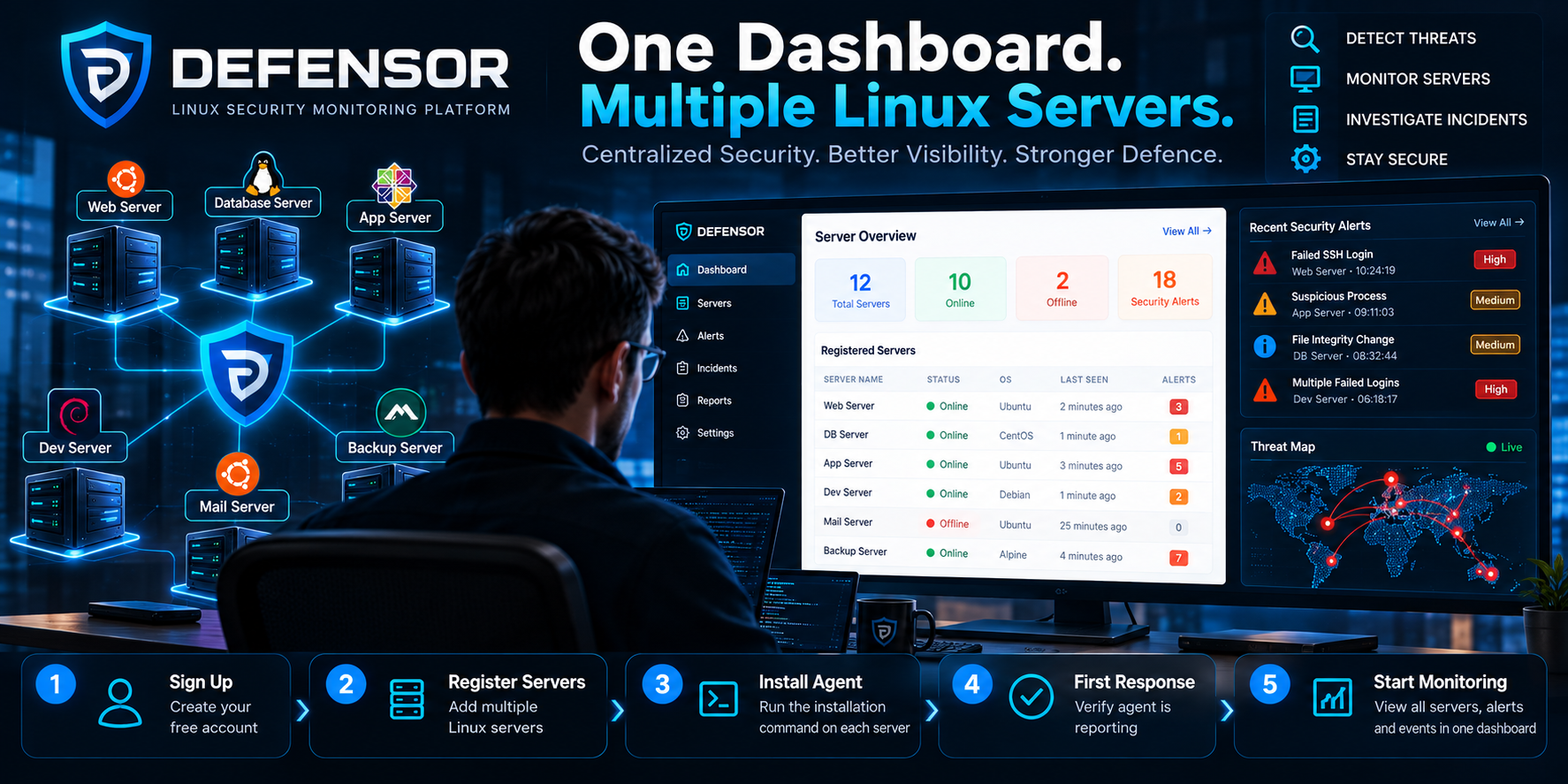
DEFENSOR brings registered Linux servers into a centralized security monitoring dashboard, helping administrators review server reporting status, access available security information, and investigate potential threats from one place.
Instead of treating every server as an isolated system, administrators can build a more organized view of their Linux infrastructure.
1. Connect Multiple Linux Servers to DEFENSOR
Getting started is straightforward.
Create a DEFENSOR account, register your servers within the available account capacity, and install the DEFENSOR Security Agent on each supported Linux server using its assigned credentials.
For each server:
- Register the server in DEFENSOR Server Management.
- Obtain its unique Server ID and API Token.
- Install the Security Agent using the corresponding installation command.
- Verify that the agent service is running.
- Wait for the first successful response and confirm reporting in the dashboard.
Repeat the process for each server you want to monitor.
Every server must use its own assigned credentials. This helps ensure that agent reports are associated with the correct server in your account.
2. Monitor Multiple Servers from One Dashboard
Once the agents are reporting, DEFENSOR provides a centralized place to review the servers associated with your account.
Depending on the available dashboard features and enabled modules, administrators can use the platform to review:
- Server status: Identify servers and check their reporting status.
- Security alerts: Review available alerts that may require investigation.
- Security events: Examine reported security-related activity.
- Incident information: Access supported incident details and investigation context.
- Server-specific information: Focus on an individual registered server when deeper investigation is necessary.
This centralized approach reduces the need to switch constantly between separate server sessions just to establish an overview of your infrastructure.
The goal is simple: make security monitoring more organized, accessible, and manageable as your server environment grows.
3. Identify Which Servers Need Attention
In a multi-server environment, not every server presents the same operational or security priorities.
A web server may experience repeated authentication failures, while a database server may generate an unexpected security event. Another server may stop reporting because of a service or connectivity problem.
A centralized dashboard helps administrators identify where attention may be needed.
For example, when reviewing a security alert, an administrator can determine which registered server generated the event, inspect the available details, and decide whether further investigation is necessary.
The dashboard supports visibility and investigation; administrators should verify alerts before concluding that a server has been compromised.
4. Investigate Security Events with Server Context
A security alert becomes more useful when the administrator can connect it to the server that generated it.
Consider a Linux infrastructure containing:
- A public-facing web server.
- A database server.
- An application server.
If suspicious activity is reported by one of these systems, the administrator can use the available DEFENSOR information to identify the associated server and investigate the event.
This helps establish a more structured investigation process without requiring every initial review to begin with a separate terminal session.
Where deeper investigation is necessary, administrators can use the relevant server's logs and native Linux security tools to validate what happened.
5. Maintain Visibility Across Your Infrastructure
Centralized monitoring is not only about reviewing alerts. It is also about understanding whether your registered servers are continuing to report.
An inactive agent, network disruption, or service failure can create a gap in monitoring visibility.
Administrators should periodically check reporting status and investigate unexpected gaps. A server that has stopped reporting should not automatically be assumed to be secure simply because no new alerts appear.
Useful operational practices include:
- Checking agent health and reporting status.
- Reviewing important security alerts promptly.
- Investigating suspicious events in context.
- Keeping Linux systems and agents updated.
- Protecting server credentials and restricting account access.
- Verifying that monitoring continues after maintenance or configuration changes.
These practices help administrators maintain a more reliable view of their infrastructure.
6. Scale Your Monitoring as Your Infrastructure Grows
As applications expand, businesses may operate separate servers for websites, databases, APIs, internal applications, and other workloads.
Managing each server independently can make it harder to maintain consistent security oversight.
DEFENSOR's centralized server management model helps users organize registered Linux servers under one account and review the monitoring information available to them.
The number of servers you can register depends on your account's available capacity and subscription plan.
Start with one server, verify successful reporting, and add further servers as your infrastructure and account capacity allow.
Why Centralized Server Defence Matters
A centralized security dashboard helps turn separate server-level observations into a more organized monitoring workflow.
With DEFENSOR, administrators can work toward:
- Better visibility across registered Linux servers.
- A central location for reviewing available security alerts.
- More organized investigation of server-specific events.
- Easier identification of reporting or monitoring gaps.
- A scalable workflow for managing growing Linux infrastructure.
Actual detection and response capabilities depend on the deployed agent, enabled modules, configuration, and the security controls available on each server.
Conclusion: One Dashboard. Multiple Servers. Better Security Visibility.
Managing multiple Linux servers should not require losing sight of the bigger picture.
By connecting supported Linux servers to DEFENSOR, administrators can review registered systems and their available security information through one centralized dashboard.
Connect your servers. Verify agent reporting. Monitor security events. Investigate suspicious activity.
Start with DEFENSOR and bring your Linux server monitoring into one place.
DEFENSOR — The Attack Stops Here.
Get started: https://defensor.in/
Related guide: How to Use DEFENSOR: A Step-by-Step Guide to Linux Server Security Monitoring