
Cyberattacks do not always end when an attacker gains initial access to a system. In many cases, attackers attempt to maintain access so they can return later, even after passwords are changed or the original vulnerability is patched.
This technique is known as persistence. For organizations running Linux servers, applications, databases, and cloud infrastructure, monitoring persistence mechanisms is an important part of a strong cybersecurity strategy.
DEFENSOR helps security teams monitor Linux persistence-related changes and investigate potentially suspicious activity from a centralized security platform.
What Is Persistence in Cybersecurity?
Persistence refers to techniques that allow an attacker to maintain access to a compromised system over time.
After gaining access, an attacker may attempt to create a scheduled task, install or modify a service, add an unauthorized SSH public key, or change a startup script. These mechanisms may allow malicious activity to continue after a reboot or after the original entry point has been removed.
Not every persistence-related change is malicious. Legitimate administrators and software updates regularly modify system configuration. The challenge is identifying unexpected or unauthorized changes.
Why Is Persistence Monitoring Important?
1. Detect Unauthorized System Changes
A system may appear healthy while an unauthorized service or scheduled task remains active. Monitoring persistence-related locations helps security teams identify changes that deserve investigation.
2. Identify Suspicious Cron Jobs
Linux cron jobs automate recurring tasks. Attackers may abuse them to schedule unwanted scripts or recurring activities.
Monitoring cron-related locations can help identify unfamiliar jobs, unexpected scripts, and changes that do not match approved administrative activity.
3. Monitor Systemd Services
Systemd services and their configuration files are essential components of many Linux systems. Unexpected services, modified unit files, or suspicious drop-ins can indicate unauthorized configuration changes.
Persistence monitoring helps administrators review these changes and determine whether further investigation is necessary.
4. Protect SSH Access
SSH authorized keys provide convenient, passwordless access to servers. However, an unauthorized public key can also provide an attacker with a way to return to a system.
Monitoring changes to authorized keys helps security teams investigate unfamiliar keys and unexpected modifications to SSH access configurations.
5. Inspect Shell Startup Files
Files such as .bashrc, .profile, .bash_profile, and .zshrc can execute commands or configure the shell environment when users start a session.
Unexpected modifications to these files may indicate suspicious activity. Monitoring them adds another layer of visibility into potential persistence attempts.
6. Review Application Persistence Locations
Web applications and server-side software can contain scripts, configuration files, and other components that attackers may attempt to abuse.
Monitoring relevant application paths can help security teams identify unexpected changes and investigate possible compromise.
What Should Linux Persistence Monitoring Cover?
A useful persistence monitoring strategy should consider several areas:
- Cron jobs: Scheduled tasks and cron configuration directories.
- Systemd: Service unit files, drop-ins, and related configuration.
- SSH authorized keys: Changes to trusted public keys.
- Shell startup files: User and system-level shell initialization files.
- Application paths: Relevant web and application directories.
- System startup mechanisms: Other approved locations that may be used to establish recurring execution.
The exact locations to monitor depend on the Linux distribution, installed applications, operational requirements, and security policy.
How DEFENSOR Supports Persistence Monitoring
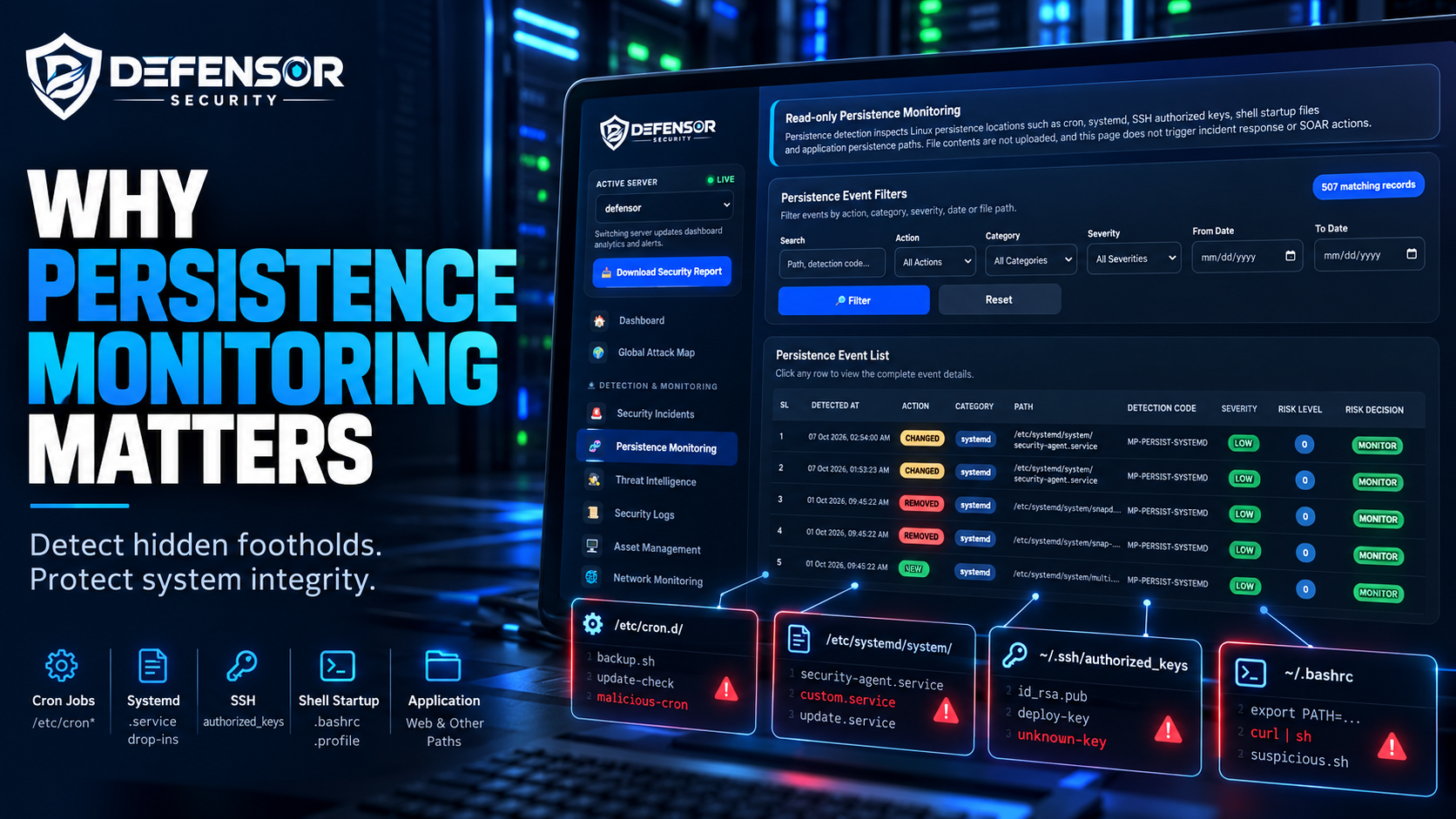
DEFENSOR provides a centralized view of Linux persistence-related events to help security teams review changes and investigate potential risks.
Its read-only persistence monitoring capability is designed to inspect relevant system locations without modifying or deleting the inspected files.
Key capabilities include:
- Read-only inspection: Review supported persistence locations without changing their contents.
- Event visibility: Examine detected changes and other recorded persistence events.
- Filtering: Narrow event lists by action, category, severity, date, or file path.
- Risk context: Review available severity, suspicion, and risk information to help prioritize investigations.
- Centralized monitoring: Access persistence-related visibility alongside other security monitoring capabilities.
Importantly, read-only inspection of persistence artifacts does not by itself prove that a system has been compromised. Security teams should validate findings against approved configuration, change records, and other relevant evidence.
DEFENSOR's persistence monitoring page also does not upload inspected file contents or automatically trigger incident response or SOAR actions. This keeps the monitoring function focused on inspection and visibility rather than automatic remediation.
Persistence Monitoring vs. Traditional Security Monitoring
Traditional security monitoring often focuses on network traffic, authentication events, malware alerts, and suspicious processes. These are essential sources of security information, but they may not provide sufficient visibility into every change that could help an attacker maintain access.
Persistence monitoring adds another layer by focusing on locations where recurring execution or continued access can be configured.
Combining these capabilities can help organizations build a more complete picture of suspicious activity across their Linux infrastructure.
Best Practices for Effective Persistence Monitoring
Organizations should consider the following practices:
- Establish a baseline: Document approved services, scheduled tasks, SSH keys, and startup configurations.
- Monitor meaningful changes: Pay attention to unexpected modifications, additions, and removals.
- Investigate unfamiliar artifacts: Verify the owner, purpose, origin, and change history of suspicious entries.
- Correlate security events: Compare persistence findings with authentication logs, endpoint alerts, network activity, and deployment records.
- Apply least privilege: Limit administrative access and control who can modify critical system configuration.
- Maintain audit records: Preserve relevant event metadata and investigation findings according to organizational policy.
- Review regularly: Reassess monitoring coverage as systems, applications, and infrastructure evolve.
Conclusion
Persistence monitoring is an important component of Linux server security because attackers may attempt to preserve access through scheduled tasks, system services, SSH keys, startup files, and application-related locations.
By identifying unexpected changes and giving security teams useful event context, persistence monitoring can support earlier investigation and stronger security operations.
DEFENSOR brings persistence-related visibility into a unified security monitoring environment, helping teams review suspicious changes and make informed investigation decisions while keeping inspection read-only.
Explore DEFENSOR to learn how centralized security monitoring can help your organization strengthen its Linux security posture.